Showing posts with label javascript. Show all posts

Friday, April 01, 2016

Angular 2 Resources

Official web site

https://angular.io

Official Github Repo

https://github.com/angular/angular
A few notable sub-directories:

Angular CLI

https://github.com/angular/angular-cli
Command line interface. It helps to build skeleton code for a new project that follows best practice. Not officially released yet. But very helpful. It generates project with proper folder structure, unit testing and end2end tests are also included.

npm packages


Blog about Angular 2 (and other Software topics) by Victor Savkin

http://victorsavkin.com
There are not many tutorials here, but those few entries will give us a deep dive into Angular 2 design philosophy.

egghead.io

https://egghead.io/technologies/angular2
A series of short video tutorials about angular 2.

Stackoverflow tagged Angular 2

http://stackoverflow.com/questions/tagged/angular2


Monday, November 16, 2009

"SelectAll" CheckBox in GridView using jQuery

Here is a way to do it:


/**
* Register logic for "select all" check box and the group of check boxes
* for each data row.
*
* @param {Object} chkAllSelector jQuery selector to find the "select all" check box
* @param {Object} chkItemSelector jQuery selector to find the check boxes for all the rows
*/

function registerSelectAll(chkAllSelector, chkItemSelector) {
//"select all" checkbox
var checkAllBox = $(chkAllSelector);
//checkbox for each row
var checkItems = $(chkItemSelector);

//check/uncheck all rows if "select all" is clicked
checkAllBox.bind("click", function(){
checkItems.each(function(){
this.checked = checkAllBox[0].checked;
})
});

//uncheck "select all" if some rows are unchecked
checkItems.bind("click", function(){
if(this.checked === false) {
checkAllBox[0].checked = false;
}
});
}


To use it:

registerSelectAll(".chkAllHeader input", ".chkItem input");

Friday, December 07, 2007

Embedding Chart in Web Pages Made Easy

This week, embedding charts in your web page (either dynamic or static) is made extremely easy by the release of two new tools by Yahoo and Google. Both released free tools to help create chart online.

I am not sure if this is competition between Yahoo and Google or just coincidence. The two tools are released within the same week (this week):
YUI 2.4.0 released on 12/04/2007
Google Chart API released on 12/06/2007

The two tools actually complement each other.

Google Chart API:

Nothing can describe it better than the following text on their web site:
The Google Chart API lets you dynamically generate charts. To see the Chart API in action, open up a browser window and copy the following URL into it:

http://chart.apis.google.com/chart?cht=p3&chd=s:hW&chs=250x100&chl=Hello|World

Press the Enter or Return key ...
Pros:
- absolutely the simplest and the easiest chart tool I have ever seen;
- there is no CPU overhead on your web server and client's computer;
Cons:
- may have problem serving chart over SSL (at least IE will complain about secure and non-secure content on the same page);
- chart is static, no user interaction;
- very limited control over chart's look and feel;
- can only show limited data range;
- can only show limited number of data points;
- your data has to be sent to a Google server, it may be a security concert;

Below is a sample chart serve by Google Chart API. It is the real thing! Served dynamically from Google's server farms! It takes me only 20 seconds to embed it into this blog.


Yahoo! User Interface Library (YUI):

YUI implementation is based on a Flash component. You will need to write JavaScript to control the data and look&feel on the Flash chart.
Pros:
- Rich user interaction (there is potential to allow user zoom, pan, or edit charts);
- More control over look and feel;
- Can show more data;
- Can be hosted on your own server (no worry about Google being BIG BROTHER or going BANKRUPT);
- Less Internet traffic is required (only need to download data, not PNG or any other image files);
- Can serve live data (again, only data download is needed, we can afford to update the chart frequently);
Cons:
- substantial JavaScipt programming and HTML editing is required;
- end user need to have Flash Player 9.0.45 or higher (not many people have that as on December 2007);
- end user's computer must have some spare CPU power, especially when multiple charts are embedded on the web page;

As an obvious proof of the difficulty to start using YUI, I am not willing to try to embed a sample chart here in my blog! :-(

The Verdict:
If you want a simple chart embedded on a static page or your blog, use Google Chart API.
If you have total control of your web server, and want to create powerful dynamic charts, use YUI 2.4.0's experimental chart component.

Last Words:
Of course, if you have enough server side CPU power and deep programming knowledge, server side chart rendering always give you ultimate control over the look and feel of your charts. On this end, you have these great open source libraries to help you: ZedGrap (C#), JFreeChart (Java), ASTRA (Flash).

Friday, November 02, 2007

Aptana Out of Beta: 1.0 Released

Just noticed that Aptana has been out of beta. In the 2.0 era when everything stays "BETA" forever, this is a rare achievement.

In version 1.0, an open-source Community edition and a commercial Professional edition are available at the same time. The professional edition definitely deserves the nominal price it asked for. But as its name suggests, only professionals really have an urge for that edition. The free Community edition has enough features for 90 percent of its potential users.

My main IDE is still Visual Studio 2005. But the Javascript editor in Aptana is the best I ever seen. Its auto-complete is way better than even the latest Visual Studio 2008 Beta2.

Thursday, October 18, 2007

JSLint with ANT

jslint4java:
"This is a java wrapper around the fabulous tool by Douglas Crockford, jslint. It provides a simple interface for detecting potential problems in JavaScript code."


With this tool, batch scan JavaScript files with JSLint is a piece of cake. Here is a sample ANT target:

<target name="jslint.src.js" depends="init">
<description>scan javascript files using jslint</description>
<apply executable="java" parallel="false" failonerror="false">
<arg value="-jar" />
<arg file="${tools.dir}/${jslint}" />
<arg value="--bitwise" />
<arg value="--browser" />
<arg value="--undef" />
<arg value="--widget" />
<srcfile />
<sort xmlns:rcmp="antlib:org.apache.tools.ant.types.resources.comparators">
<rcmp:name />
<fileset dir="${web.js.dir}">
<include name="**/*.js" />
<exclude name="**/YUI/**" />
<exclude name="**/*-min.js" />
<exclude name="**/*-debug.js" />
</fileset>
</sort>
</apply>
</target>


For ease of future reference, JSLint output can be redirected to a text file:
ANT jslint.src.js > jslintreport.txt

YUI Compressor in ANT

Here is a sample ANT target to batch minify all JavaScript files using YUI Compressor:


<target name="js.minify" depends="init">
<description>minify js files</description>
<apply executable="java" parallel="false" failonerror="true">
<arg value="-jar" />
<arg file="${tools.dir}/${yuicompressor}" />
<arg value="--nomunge" />
<!-- line break set at 20 characters, so that we can get many line breaks, this
is good for debugging in IE-->
<arg value="--line-break" />
<arg value="20" />
<arg value="--preserve-strings" />
<arg value="--preserve-semi" />
<arg value="--charset" />
<arg value="ISO-8859-1" />
<arg value="-o" />
<targetfile />
<srcfile />
<!-- files are processed in alpha-order so that we can know the progress,
and easily identify the file that is failed.-->
<sort xmlns:rcmp="antlib:org.apache.tools.ant.types.resources.comparators">
<rcmp:name />
<fileset dir="${src.dir}">
<include name="**/*.js" />
<exclude name="**/YUI/**" />
<!-- avoid cycling -->
<exclude name="**/*-min.js" />
</fileset>
</sort>
<!-- define output file name -->
<mapper type="glob" from="*.js" to="*-min.js" />
</apply>
</target>

About YUI Compressor: it is a tool to minimize JavaScript and CSS files. I have used it for more 6 months on a public web site without any problem.

About ANT:
I have been using APACHE ANT for 7 years, since 2001. To me, an ANT build file structure is more intuitive and scalable than MAKE files.
Apache Ant is a Java-based build tool. In theory, it is kind of like Make, but without Make's wrinkles.

This is the post that gets me started on this direction:
Building Web Applications With Apache Ant

Friday, August 31, 2007

YUI widget "Dialog" now depends on "Button Control"

Environment: YUI 2.3, IE 7.0

This is another problem I discovered during update from YUI 0.12 to YUI 2.3. As always, when updating library, there are many surprises that you have to run into.

Problem: Error message: "Error: Function expected" appears when I call the "render" method of YUI "Dialog" control a second time on the web page. Turn out the offending line is here: container.js, line: 6373,
if (oButton instanceof YAHOO.widget.Button) {

Why: The new "Dialog" implementation depends on the "Button" control now. Due to the above offending line, the dependency is not "optional" as stated in the documentation even if you don't use the new button control. If you don't include "button.js", you program will break at the above point.

Fix: If you are willing to change the source code, we can change the offending line to something like this:
if (YAHOO.widget.Button && oButton instanceof YAHOO.widget.Button) {
BUT, I am 80% sure, at another line, or in another control, I may run into the same problem again.
So, the best bet is to include "Button.js" to my web page.

Thursday, August 23, 2007

Error: "YAHOO.util.CustomEvent is not a constructor"

The Problem: This error message ("YAHOO.util.CustomEvent is not a constructor") appears after I update my YUI library from 0.12 to the latest release (2.3). There was no such error before the update.

The Why: The new Container in YUI implementation fires CutomEvent at various stage, thus is dependent on the event utility. In my old web pages, the .js files happened to be included in the wrong orders (container.js was included before event.js) and caused this error message.

The Fix: include "event.js" before "container.js". Better yet, try the new YUILoader utility which claims to be able to load the correct libraries automatically.

The Lesson: Whenever you see an error like "[XYZ] is not a contructor", try to check for typo then file dependence.

Link: Also see this thread on YUI discussion group:
http://tech.groups.yahoo.com/group/ydn-javascript/messages/16266?threaded=1&m=e&var=1&tidx=1

Thursday, August 09, 2007

Using SyntaxHighlighter on BLOGGER

SyntaxHighlighter is a
Free syntax highlighter written in JavaScript
It can insert colored code snippets on a web page using client-side javascript only. It is ideal tool for users of BLOGGER because we do not have server side resource to parse and highlight the code. And we are lazy, we do not want to write a lot of CSS to just post a code snippet. :-).

However it takes a little twisting to make it work properly.

Below are the steps to setup:
1. Download and find a place to host the library files for SyntaxHighlighter. A free choice is, of course, Google Page Creator;
2. Login to BLOGGER, go to: "Settings > Template > Edit HTML", make the following changes (credit goes to yehyeh's blog):

</div></div> <!-- end outer-wrapper -->
<link href='http://[YOUR HOST]/SyntaxHighlighter.css' rel='stylesheet' type='text/css'/>
<script src='http://[YOUR HOST]/shCore.js' type='text/javascript'/>

<script src='http://[YOUR HOST]/shBrushCpp.js' type='text/javascript'/>
<script src='http://[YOUR HOST]/shBrushCSharp.js' type='text/javascript'/>
<script src='http://[YOUR HOST]/shBrushCss.js' type='text/javascript'/>
<script src='http://[YOUR HOST]/shBrushJava.js' type='text/javascript'/>
<script src='http://[YOUR HOST]/shBrushJScript.js' type='text/javascript'/>
<script src='http://[YOUR HOST]/shBrushSql.js' type='text/javascript'/>
<script src='http://[YOUR HOST]/shBrushXml.js' type='text/javascript'/>

<script class='javascript'>
//<![CDATA[
function FindTagsByName(container, name, Tag)
{
var elements = document.getElementsByTagName(Tag);
for (var i = 0; i < elements.length; i++)
{
if (elements[i].getAttribute("name") == name)
{
container.push(elements[i]);
}
}
}
var elements = [];
FindTagsByName(elements, "code", "pre");
FindTagsByName(elements, "code", "textarea");

for(var i=0; i < elements.length; i++) {
if(elements[i].nodeName.toUpperCase() == "TEXTAREA") {
var childNode = elements[i].childNodes[0];
var newNode = document.createTextNode(childNode.nodeValue.replace(/<br\s*\/?>/gi,'\n'));
elements[i].replaceChild(newNode, childNode);

}
else if(elements[i].nodeName.toUpperCase() == "PRE") {
brs = elements[i].getElementsByTagName("br");
for(var j = 0, brLength = brs.length; j < brLength; j++) {
var newNode = document.createTextNode("\n");
elements[i].replaceChild(newNode, brs[0]);
}
}
}
//clipboard does not work well, no line breaks
// dp.SyntaxHighlighter.ClipboardSwf =
//"http://[YOUR HOST]/clipboard.swf";
dp.SyntaxHighlighter.HighlightAll("code");
//]]>
</script>

</body>
</html>


3. Now you can post code snippet on BLOGGER using either "pre" or "textarea" tag.

Notice:
  1. The solution above is found here: http://yehhou.blogspot.com/2007/06/blogger-dpsyntaxhighlighter.html. That blog was written in Chinese. I made some minor changes and posted here. The reason for the Javascript code to remove <br/> tags is because BLOGGER has a setting to automatically add <br/> where there is line break. It is very convenient feature for blog posters, but somehow syntax highlighter will display the <br/> tag in plain text;
  2. Clipboard for the SyntaxHighlither does not work well here. It tends to give you the text without line breaks, so I commented out the Javascript that setup the clipboard function;
  3. When posting HTML code, remember to replace < with &lt;, and replace > with &gt;;
Next:
Now you've got beautiful code in your blog, next step might be some nice charts for your blog. You will find a way to embed a chart with one line HTML code here: Embedding Chart in Web Pages Made Easy
And, here is a post to show you how to Embed Silverlight video on Blogger:Embed Silverlight Streaming in Blogger

Update 11/11/2008
There are a few questions and comments regarding script hosting. .NET Dev posted an interesting idea here:
http://urenjoy.blogspot.com/2008/10/publish-source-code-in-blogger.html

Basically, he setup the links directly to the trunk location of SyntaxHighlighter project.

Update 07/07/2010
I found using gist.github.com is way easier to paste syntax highlighted code in blogger. Here is my post showing you how to use it:

Syntax Highlighting on Blogger - Gist

Thursday, July 19, 2007

Javascript "Empty Statement"

Spot anything wrong in the Javascript below?
var a=[];
//initialize array
for(int i = 0; i < 10; i++);
{
a[i] = 100;
}

Values in array a will be:
[undefined, undefined, 100]

The semicolon at the end of the for loop forms an "Empty Statement". So a[i]=100; is actually outside of the for loop!

Wednesday, February 21, 2007

The Best of Both Worlds (Visual Studio + Eclipse)

I use Visual Studio 6.0, 2003 and 2005 every day. But when it comes to write Javascript code, Visual Studio left a lot to be desired.

The emerge of Aptana plug-in make me seriously consider install Eclipse on my development computer. Here is what I do to take advantage of Aptana's superior JS edit functions in my Visual Studio web project.
1. add a simple eclipse project under my web application development folder (this will only add one file to my project: .project);
2. associate "*.aspx" to "Aptana HTML Editor", "*.css" to "Aptana CSS Editor", "*.js" to "Aptana JS Editor";
3. add my JS library to "Code Assistant Profiles";

From now on, no matter I am writing javascript in a .js file or .aspx file, I can use Eclipse. When I am working on C# code and ASP.NET controls, I go back to VS2005.

Please look at the screen-shot to see what Aptana can do: code auto-complete with documentation of parameters, tree structured outline of code file, code refactor, code snippets, to name a few. (a side note: also get "Firebug" for JS and CSS debugging in Firefox.)

Wednesday, January 24, 2007

Bookmarklet (aka Favelet)

Only recently did I notice how powerful a bookmark could be. For a nice demo of what you could accomplish, follow this link: http://slayeroffice.com/tools/modi/v2.0/modi_help.html. This is definitely NOT what you would expect from adding a link to bookmark. Huge javascript code can be executed on the page you are currently browsing, by clicking on the bookmark.

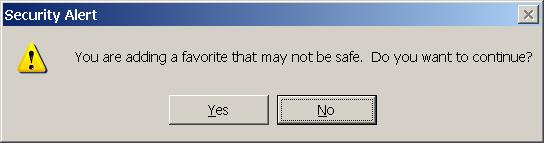
There should be some security concerns here. To Microsoft's credit, IE7 did show me a warning dialog when I tried to add the bookmark. Although the warning message is rather vague about what is wrong. There is no warning when I add it to Firefox.

Friday, December 01, 2006

Bug in YUI 0.12.0 causing "secure and nonsecure items" warning in IE6

Just when I am about to have a rest after I happily cleared the "secure and nonsecure" warning in IE7. Today, I test my web application in IE6. I got the "secure and nonsecure" warning again.

Here come the nightmare again, having to test your application in X different browsers on Y different Operating Systems. You fumble to fix bugs for one specific platform and seeing your fixes screwed up totally in another platform.

Fortunately, this time, "I'm Feeling Lucky". I tried keyword "yui secure nonsecure" in google, and found an answer on the first page 3rd item, titled: "Bug in iframe shim code in 0.12.0 container.js?". It is only a one line change in container.js. But, I know it could take me a couple of days to narrow down to it. Thanks to Arun, it only took me 10 minutes to fix the problem this time.

Wednesday, November 29, 2006

IE7 Warning: "This page contains both secure and nonsecure items."

IE 7 come with much enhanced security features and tabbed viewing. But along with the enhancements, we (programmers) also see some new problems to work on. The one I will present below is especially hard, because it is not consistently repeatable.

Problem: serving page through HTTPS, IE7 shows the warning: "This page contains both secure and nonsecure items. Do you want to display the nonsecure items?".

According to past experience, there are 2 main reasons for this warning:
  1. There are content on the web page from non-secure source. You should remove any link to nonsecure content in order to get rid of this warning;
  2. An "IFrame" does not specify source, or specify "about:blank" as the source. IE consider this as nonsecure. You have to point the IFrame to "Javascript:false" to make IE happy;
But the one I am facing has a new twist: the warning does not show up consistently. If I refresh the page by pressing "F5", only 2 out of 10 times, I get the warning.

Findings:
After some painful experiments, I found that the the source of the problem came from my use of YUI panel. I added a background image to the panel like this:
<div class="bd" style="background-image: url(images/back.gif);">
</div>
Guess what, this combined with JavaScript in YUI constitutes the new offense for IE7. According to MSDN Knowledge Base, Article 925014 , using "removeChild()" method to delete a DIV element that references a background image is considered "nonsecure itme". I suppose somewhere in YUI library my DIV is detached and wrapped into something else than attached to the HTML document again.

Solution:
There are 2 workarounds recommended in MSDN KB 925014. The second method meets my need very well. I just moved the specification of background image to CSS. This seems to solve the problem.


More:
It still puzzles me, as why this warning only appears 2 out of 10 times. Following "Workaround" in the article did fix the warning permanently.

Although I finally fixed the problem. I wish IE7 could have provided a little more hint in why it complains about the nonsecure content or the source of the nonsecure content. Better yet, IE7 should give developer's a way to see the rendered HTML content. As far as I know, the only thing I can do is to remove elements on my page one by one, until the warning is gone.

Reference:
MSDN KB 925014 http://support.microsoft.com/kb/925014